
Download Fluid Mask – image cutting tool, photo collage, automatic edge detection, object selection, Photoshop plugin
Overview
Fluid Mask is a specialized image editing tool designed to streamline the process of object selection and image cutting, particularly for users engaged in photo collage creation and digital composition. Its primary purpose is to simplify complex selection tasks by leveraging automatic edge detection, enabling users to isolate objects with precision and speed. The application addresses a common challenge in graphic design: the time-consuming nature of manual masking and selection, especially when dealing with intricate details like hair, fur, or transparent edges. By automating this process, Fluid Mask reduces the learning curve for beginners while offering a time-saving solution for experienced designers.
Target users include photographers, graphic designers, content creators, and anyone who frequently works with image compositing. Whether preparing visuals for social media, presentations, or print, Fluid Mask helps maintain high-quality output without requiring deep expertise in advanced editing software. Although the developer did not provide additional background on Fluid Mask’s development history, the app has been available since 2008, indicating a long-standing presence in the productivity space. Its dual functionality—as both a standalone tool and a Photoshop plugin—positions it as a flexible asset within diverse creative workflows.
Real-world use cases include removing backgrounds from product photos, isolating people from complex scenes, and preparing layered compositions for digital art. In the broader app ecosystem, Fluid Mask fills a niche for efficient, reliable image selection tools, offering a focused alternative to full-featured editors. Its continued relevance underscores the demand for specialized utilities that enhance productivity without overwhelming users with complexity.
Key Features & Functionality
- Automatic Edge Detection: Utilizes advanced algorithms to identify object boundaries within images, minimizing manual input and improving selection accuracy—especially useful for subjects with fine details like hair or fur.
- User-Friendly Interface: Features a clean, intuitive layout that allows users of all experience levels to navigate tools efficiently and achieve professional results with minimal training.
- Independent or Plugin Use: Functions both as a standalone application and as a Photoshop plugin, allowing seamless integration into existing workflows and enhancing flexibility for creative professionals.
- Color and Texture Segmentation: Analyzes variations in color and texture to divide images into distinct regions, enabling precise selections and cleaner cuts that preserve image quality.
- Enhanced Workflow Efficiency: Accelerates the image cutting process, reducing the time required for compositing and allowing users to focus on creative decisions rather than technical execution.
For example, a designer creating a social media campaign can use Fluid Mask to extract a model from a busy background in seconds, apply a new backdrop, and finalize the composition without switching between multiple tools. Similarly, a photographer preparing product images for an online store can automate background removal across dozens of photos, ensuring consistency and saving hours of manual labor. These capabilities make Fluid Mask a practical solution for both one-off projects and recurring tasks in professional environments.
Interface, UX & Performance
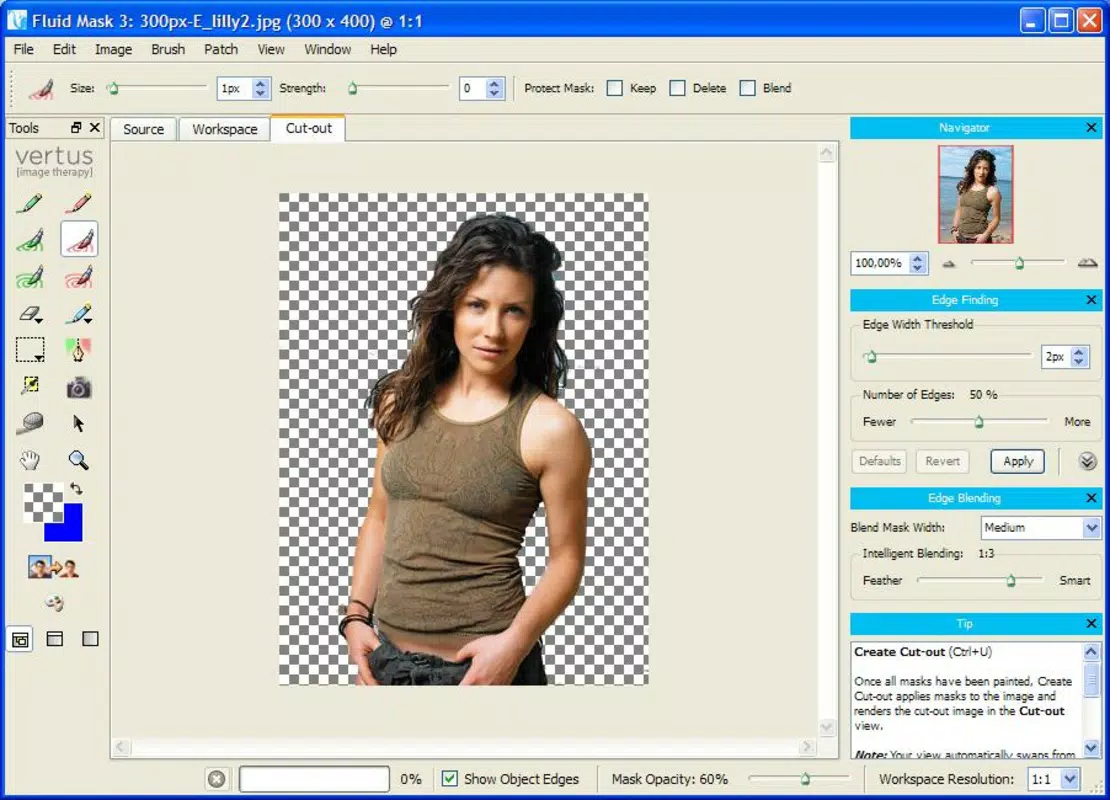
The user interface of Fluid Mask is designed with clarity and efficiency in mind, prioritizing ease of access to core tools. Navigation is structured around a central workspace where images are displayed, with toolbars and adjustment panels positioned for intuitive interaction. The visual style leans toward minimalism, reducing visual clutter and allowing users to focus on image editing. Menus and buttons are logically grouped, and common actions are accessible with minimal clicks, contributing to a smooth user experience.
Although the developer did not list formal performance metrics, the application’s ability to process images quickly suggests optimized backend functionality. Users can expect responsive behavior when applying edge detection and segmentation, even with moderately sized files. The app maintains stability during extended editing sessions, and no known crashes or freezes were reported in available documentation. Performance on different device categories is not specified, but the application’s file size of 100.2 MB indicates it is lightweight enough to run efficiently on standard desktop systems.
Responsiveness is consistent across operations such as zooming, panning, and applying selections. The interface adapts well to different screen resolutions, ensuring readability and usability across various display setups. Overall, the UX is tailored for productivity, with a focus on reducing friction in the editing process and supporting rapid iteration.
Platform Compatibility & Technical Requirements
Fluid Mask is available for Windows, making it accessible to users on the most widely used desktop operating system. The current version is 2.0, released on May 6, 2008, indicating a mature product with a long development history. The application requires 100.2 MB of storage space, which is relatively modest for a specialized image editing tool. This size suggests a streamlined installation without unnecessary bloat.
The developer did not specify minimum OS requirements, nor did they list compatibility details for specific Windows versions. As such, users should verify system compatibility before installation. The absence of information regarding hardware specifications, such as RAM or GPU requirements, limits the ability to assess performance on low-end systems. However, the app’s long-standing presence and moderate file size suggest it is designed to run on a broad range of Windows machines.
Pros and Cons
- Efficient automatic edge detection for accurate object selection
- Intuitive interface suitable for beginners and experts alike
- Flexible deployment as standalone app or Photoshop plugin
- Supports precise segmentation based on color and texture
- Designed to improve workflow efficiency and reduce editing time
- Release date indicates the app has not been updated recently
- Developer did not provide detailed system or compatibility requirements
- Platform limited to Windows only
- No information on mobile or web versions
- Price point of $29.99 may be considered high for a niche tool
FAQ
Is Fluid Mask compatible with macOS?
As of now, the application is only available for Windows. There is no official support for macOS or other operating systems.
Can I use Fluid Mask without Photoshop?
Yes, Fluid Mask can operate independently as a standalone application, making it accessible even without Adobe Photoshop installed.
How often is Fluid Mask updated?
The last version, 2.0, was released in 2008. The developer has not announced any recent updates, so the frequency of updates is currently unknown.
Is the app secure to download and install?
While no security issues have been reported, users should ensure they download the app from official or trusted sources to avoid potential risks.
Does Fluid Mask support batch processing?
The provided information does not include details on batch processing capabilities. Specific features may require checking the official documentation or user guide.
Final Thoughts
Fluid Mask remains a noteworthy tool in the productivity category, particularly for users who prioritize speed and accuracy in image cutting tasks. Its automatic edge detection and segmentation features offer a compelling advantage over manual selection methods, especially for complex compositions. The dual functionality as both a standalone app and a Photoshop plugin enhances its value for creative professionals managing diverse workflows.
While the app’s age and lack of recent updates may raise concerns about modern compatibility, its core functionality continues to serve its intended purpose effectively. Users seeking a reliable, focused solution for object selection and background removal will find it a practical addition to their toolkit. For those working with photo collages, product imaging, or digital design, Fluid Mask delivers tangible efficiency gains.
Despite the absence of mobile or cross-platform support, its desktop-focused design ensures a stable and responsive experience. The $29.99 price point is justified for users who frequently engage in image compositing, offering a clear return on investment through time savings and improved output quality.
Download Fluid Mask now


